PuTTY and VI/VIM Cursor Keys Not Working in Insert Mode

When using PuTTY to SSH to a Linux server and edit files, I’ve encountered on several occasions where navigating in vim using the cursor (arrow) keys on the keyboard while in insert mode results in control characters and/or new lines being inserted. Here are a couple of ways to rectify the situation.

  1. Check if the vim command is pointing to the full version of vim or vim tiny.
    $ which vim

    Some Linux distros link vim to vim tiny. If it’s pointing to the normal vim, skip to step 4, below.

  2. If you’re using vim tiny and want to continue to do so, then edit /etc/vim/vimrc.tiny and add the command set nocompatible to turn off compatibility mode.
  3. If you’d rather have the normal vim editor, then install it. After installation, confirm that the vim command points to the correct version and continue with step 4, below.
  4. Check that /etc/vim/vimrc (or ~/.vimrc) contains the command, set no compatible, to turn off compatibility mode.

That should do it. If you still have trouble, be sure that your terminal is set correctly in PuTTY and on the remote system.

Have another way to fix this issue? Post it in the comments.
Open a Custom Menu Link in a New Window

If you’re using custom menus in WordPress, you may have run into a time when you wanted a menu item to open in a new window or tab instead of the current one. In recent versions of WordPress, various options in the admin screens are hidden in a panel called Screen Options. The target of a menu link is just such a hidden option. To turn it, and some others, on do the following:

  1. Click on Menus in the Appearance section.
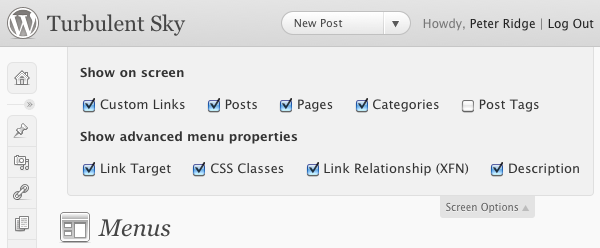
  2. Near the top-right of the Menus page, click on Screen Options and check the box labelled Link Target under the Show advanced menu properties heading as shown below.
Screen Options panel for Menus

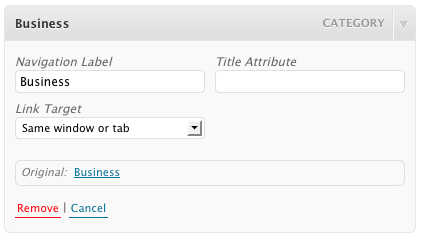
After enabling the option, the options available for each type of menu item will now contain a drop down list called Link Target where you can select whether the menu opens in the current window/tab or a new one.

Link Target option is now available for all menu items

The Screen Options panel has additional options that can be enabled. Explore the Screen Options panel in other areas of the WordPress admin interface for more hidden capabilities.